


Code Reader
HD1012V/24V Heavy-Duty & OBD2 Diagnostic Scanner
Combine heavy-duty standard-protocol checks with passenger-vehicle OBDII/EOBD diagnosis. Read codes and live data, view graphs and inspect CAN nodes with a 2.4-inch TFT display and Mini USB…
Product overview
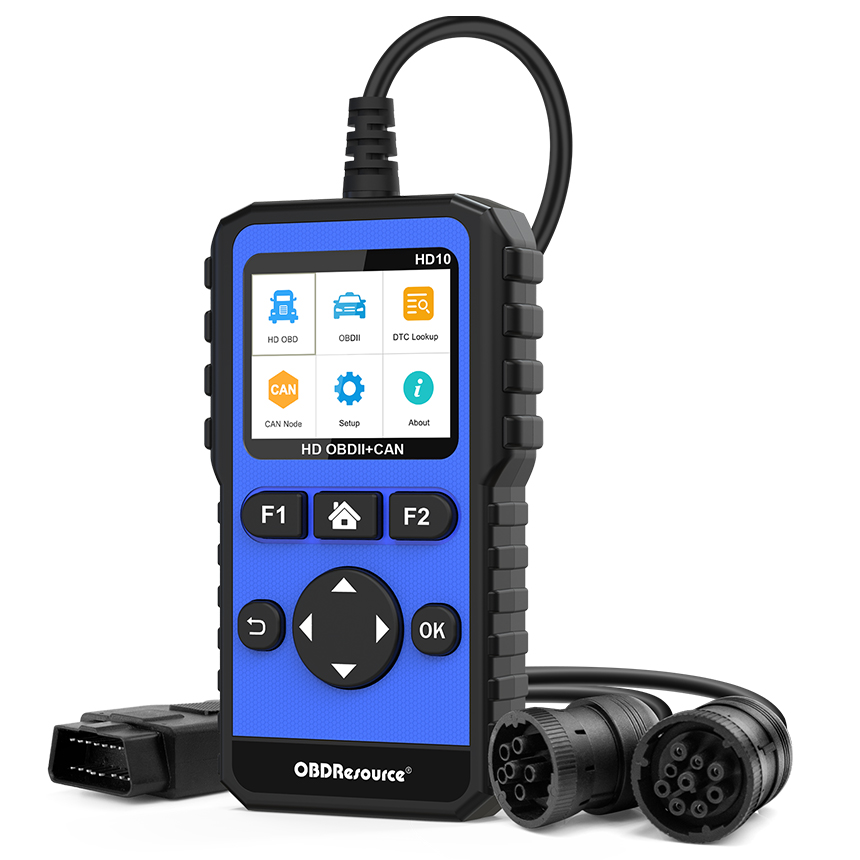
The OBDResource HD10 combines supported heavy-duty standard-protocol diagnostics and OBDII/EOBD emissions-related engine checks in one handheld tool. Select the appropriate mode to review DTCs and live data. Vehicle voltage, connector and protocol must all be compatible; a matching 9-pin or 16-pin connector alone is insufficient.
Key capabilities
Heavy-duty standard-protocol diagnostics
Supports SAE J1939 and SAE J1587/J1708 for fault-information reading/clearing and live data from accessible, supported control modules. Available modules and tests depend on the vehicle and protocol.
OBDII/EOBD engine checks
Access emissions-related engine DTCs, I/M readiness, live data, freeze frames, oxygen-sensor tests, on-board monitoring, EVAP Mode $08 and vehicle information where supported by the ECU. This does not imply ABS, airbag or body-system coverage on every vehicle.
Live-data graphs and CAN node checks
View supported data numerically or graphically on the 2.4-inch TFT color display. CAN node checks assist network-response inspection but do not replace oscilloscope measurements or complete wiring diagnosis. Use Mini USB for applicable software updates.
Suggested workflow
Confirm vehicle specifications — Confirm system voltage, diagnostic connector and protocol, then select the prescribed cable or truck adapter.
Select the correct diagnostic mode — Select heavy-duty or OBDII/EOBD mode for the vehicle and read the initial faults and related data.
Investigate using the data — Use graphs, freeze frames or supported monitor tests with service information. Save relevant information before clearing codes.
Verify after repair — Recheck faults and data after correcting the cause. I/M readiness reports monitor status and does not guarantee an inspection pass.
Frequently asked questions
Does it work with every 9-pin or 16-pin vehicle?
No. Voltage, pin assignment, protocol and target module support must also match. Proprietary protocols or different wiring cannot be verified by connector shape alone.
Is coverage identical in heavy-duty and passenger modes?
No. Heavy-duty functions use supported J1939 or J1587/J1708 communications. Passenger OBDII/EOBD functions focus on standard emissions-related engine data; available functions are vehicle-dependent.
Can a CAN node check locate the exact wiring fault?
Not by itself. Node response can guide troubleshooting, but confirm the cause with power, ground, wiring, resistance or waveform checks as appropriate.
Can it program ECUs or clear every warning?
This is a diagnostic code-reading tool, not an ECU programming or flashing service. Code clearing and warning status depend on vehicle conditions and whether the actual fault is resolved.
Product design
Documentation and support
Key features
Applications
Technical specifications
| Item | Specification or function |
|---|---|
| Model | HD10 |
| Diagnostic modes | Heavy-duty standard-protocol / OBDII and EOBD engine emissions diagnosis |
| Vehicle system voltages | 12 V / 24 V, with compatible vehicle and connection |
| Heavy-duty protocols | SAE J1939 / SAE J1587/J1708 |
| Connections | 16-pin OBDII connector and 9-pin truck adapter |
| Display | 2.4-inch TFT color display |
| Body dimensions | 137 × 79 × 22 mm |
| Operating temperature | −20°C to 70°C |
| Fault information | Supported-module DTC reading/clearing and DTC reference lookup |
| Live data | Numeric and graph display; parameters depend on vehicle and protocol |
| Additional OBDII functions | Freeze frame, I/M, oxygen sensors, on-board monitors, EVAP Mode $08 and vehicle information where ECU-supported |
| Network check | CAN node detection |
| Update interface | Mini USB |
| Controls | Physical buttons and on-screen menus |
| Core package items | HD10 unit, truck adapter, USB cable and manual; confirm the purchased version |
Confirm the protocol, accessible modules and functions for the specific vehicle. Passenger OBDII support does not imply full-system coverage or ECU programming.
OBDRESOURCE
